Introduction
A good laptop can change how a student learns, but for many families in Pakistan, buying one is simply out of reach. That is why the PM Shehbaz Sharif Free Chromebook Scheme 2026 has caught so many students’ attention.
Under this scheme, eligible students are reported to receive a free Chromebook, a free internet device and a free bag. Students from every province and board of Pakistan can apply, and both boys and girls are included.
The registration is done online, but the process is strict. According to the information we reviewed, many students are getting their forms rejected, mostly because they upload the wrong documents or skip the attestation step. This guide walks you through every stage so you can avoid those mistakes.
Note: The details below are based on a video guide about the scheme. Please confirm the latest rules, dates and the official application link from government sources before you apply.

PM Free Chromebook Scheme 2026 – Overview
| Detail | Information |
|---|---|
| Scheme Name | PM Shehbaz Sharif Free Chromebook Scheme |
| Benefits | Free Chromebook, internet device and bag |
| Eligible Students | Students who have passed Grade 9 and are currently studying |
| Gender | Boys and girls both |
| Coverage | All provinces and regions, including Punjab, Sindh, KP, Balochistan, AJK, Islamabad and Gilgit-Baltistan |
| Application Method | Online registration |
| Verification | By B-Form number, date of birth and board record |
What Do Students Get Under This Scheme?
Selected students are reported to receive three things at no cost:
- A free Chromebook (laptop)
- A free internet device, which is provided along with the laptop
- A free bag
For a student preparing for exams, doing homework or learning new skills online, these items can make a real difference. Still, receiving them depends on passing verification and final selection, so submitting a form does not guarantee a laptop.
Who Can Apply?
Before you spend time filling in the form, check these conditions.
Education Requirement
You must have passed at least Grade 9 and be currently studying. Students below Grade 9 are not eligible, and the scheme has not been opened for them.
Board and Location
Students from any province or city of Pakistan can apply. You can apply no matter which education board you belong to, whether it is Punjab, Sindh, KP, Balochistan, AJK, Islamabad or Gilgit-Baltistan.
Gender
Both male and female students can apply.
Active B-Form
The student’s B-Form number must be active, and the student must enter their own B-Form number in the form. The system checks it online, and only then does the application move to the next step.
Government School Students
If you study in a government school and your record does not appear, you can ask your school’s computer administrator to help with verification.
Documents You Need
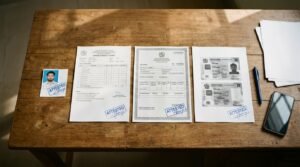
Four documents are uploaded in the online form. Keep clear copies ready before you begin.
| Document | Attestation Needed? |
|---|---|
| Passport-size photograph (recent) | No |
| Grade 9 result card (marksheet) | No |
| Student’s B-Form | Yes, must be attested |
| Father’s or guardian’s CNIC | Yes, must be attested |
About the Guardian
If the student’s father is not alive, another family member can be used as the guardian. This can be an uncle, an elder brother or the mother. Whoever you choose, their CNIC must be attested before it is uploaded.
Photo Tips
Use a proper passport-size photo with a white or blue background. A clear, recent photo avoids problems during verification.
Result Card Tip
If you download your result card from the internet, it will usually be a PDF. That is fine, and it can be uploaded.
File Size and Format Rules
Getting the file size wrong is one of the easiest mistakes to make, so check these before uploading:
- Maximum size: every file must be no more than 300 KB
- Photograph: must be in JPG format
- Result card: can be JPG or PDF
- B-Form and guardian’s CNIC: the video mentions that PNG is accepted for these two. Check the portal for any other accepted formats
If a file is too large, reduce its size using a free image compressor before you upload it.
Step-by-Step Online Application
Here is the complete process, in the order described in the video.
Step 1: Choose Your Board
Open the official application page and select the board in which you are currently studying. The list includes boards from Punjab, Sindh, KP, Balochistan, AJK, Islamabad and Gilgit-Baltistan.
Step 2: Enter Your B-Form Number and Date of Birth
Type the student’s B-Form number, then select the date, month and year of birth. Click Find My Record. If everything is correct, your details will appear.
Step 3: Check Your Auto-Filled Record
After login, the system automatically shows your name, province, school or institute, class, total marks, obtained marks, percentage and grade. Look through all of it carefully.
Step 4: Enter Father or Guardian Details
On the next page, fill in:
- The father’s or guardian’s name
- The 13-digit CNIC number
- Your roll number for the class you are currently studying
- The institute registration number, if you have one
- Your province, district and city, along with the address as it appears on your ID card
Step 5: Add Contact Details
Enter the father’s or guardian’s phone number and an active email address. This step catches many applicants out. The SIM must be registered on the CNIC of the person whose number you are entering. So if the father is applying for his child, use the father’s SIM. If a mother or elder brother is the guardian, use the SIM registered in that person’s name. Select the correct network too, such as Zong, Jazz, Ufone or Telenor.
Step 6: Upload the Four Documents
Upload them in this order:
- Passport-size photograph
- Grade 9 marksheet
- B-Form (attested)
- Father’s or guardian’s CNIC (attested)
Step 7: Accept the Declaration and Submit
Tick the declaration box at the end and submit the form. Before you press submit, read through everything once more.
What If Your Record Is Not Found?
Sometimes the system does not show your details after you click Find My Record. According to the video, there can be several reasons:
- You may not be eligible for the scheme
- Your data may not be registered with the system
- Your marks may not meet the requirement
- You may not have been made eligible under the scheme
If you study in a government school, visit your school’s computer administrator and ask them to verify your details. Remember, only students who have passed Grade 9 can apply.
Common Mistakes That Lead to Rejection
The video points out several mistakes that cause trouble:
- Not attesting the documents. If the B-Form or guardian’s CNIC is uploaded without attestation, the application can be rejected.
- Uploading wrong documents. Once submitted, students reportedly do not get an option to change them.
- Entering wrong data. Even a student who is eligible may be left out if the information is incorrect.
- Using the wrong SIM. The number should be registered on the guardian’s CNIC.
- Skipping the final check. Review every field before submitting, because small spelling or number mistakes can cost you the chance.
What to Do After Submitting
After you submit the form, you will receive a confirmation page with your reference number, photo and all the details you entered, including marks and contact information.
Save this page safely. Take a screenshot or print it out. According to the video, it will be used for the next stage of verification.
Tips for Parents and Students
Here are a few practical suggestions based on the process above:
- Collect all four documents before you open the form.
- Get the B-Form and CNIC attested first, then scan them.
- Check file sizes before uploading, not after.
- Keep the guardian’s phone nearby in case of any verification message.
- Ask a teacher or the computer administrator for help if something does not match.
- Be careful with websites and messages that ask for money. Use only official government sources for registration.
Frequently Asked Questions (FAQs)
Who can apply for the PM Free Chromebook Scheme?
Students from any province or board who have passed Grade 9 and are currently studying can apply. Both boys and girls are eligible.
Can students below Grade 9 apply?
No. The scheme has not been opened for students below Grade 9.
What will students receive?
Selected students are reported to receive a free Chromebook, a free internet device and a free bag.
Which documents are required?
You need a passport-size photo, a Grade 9 result card, the student’s B-Form and the father’s or guardian’s CNIC. The B-Form and CNIC must be attested.
What if my father is not alive?
You can use an uncle, an elder brother or your mother as the guardian. Their CNIC must also be attested.
What is the file size limit?
Each file should be 300 KB or less.
Which file formats are allowed?
The photo must be JPG. The result card can be JPG or PDF. The B-Form and CNIC can be PNG, according to the video. Check the portal for other formats.
Why is my record not showing?
Possible reasons include not being eligible, data not being registered, low marks or not being included in the scheme. Government school students can ask their computer administrator for help.
Can I edit the form after submitting?
According to the video, students often cannot change wrongly uploaded documents later. Check everything carefully before you submit.
Is the Punjab government also expected to announce an update?
The video mentions that an update from CM Punjab Maryam Nawaz Sharif’s government is expected soon. Follow official announcements for the latest information.
Conclusion
The PM Shehbaz Sharif Free Chromebook Scheme 2026 is a useful opportunity for students who have passed Grade 9, since it offers a free Chromebook, an internet device and a bag. But the application has to be done carefully.
Keep your attested documents ready, follow the file size and format rules, use the correct SIM and double-check every detail before submitting. Most rejections happen because of small, avoidable mistakes.
If you are eligible, don’t leave it for later. Prepare your documents today, and confirm the latest details through official sources before you apply.
Written by: [Author Name] | Last reviewed: [Add date after checking official sources]
Editorial note: This article is for general information and is based on a video guide about the scheme. It is not an official announcement. Rules, dates and procedures may change, so please confirm everything through official government sources before applying.